
SEO templates and worksheets only become useful when people actually use them.
Some time ago, I took over a client site with content but no metadata.
The audit findings were scattered.
No one knew where to start.
Therefore, I created a custom SEO audit spreadsheet template.
The SEO audit spreadsheet template performed two tasks.
First, it gathered every on‑page issue in one place.
Second, the SEO audit spreadsheet template helped non‑technical clients understand, prioritize, and track each fix.
Here is what I made, what I learned, and how you can use this approach.
What a Good SEO Audit Spreadsheet Template Looks Like
My SEO audit spreadsheet template had three tabs, each tab colour‑coded by priority: Medium and Low.
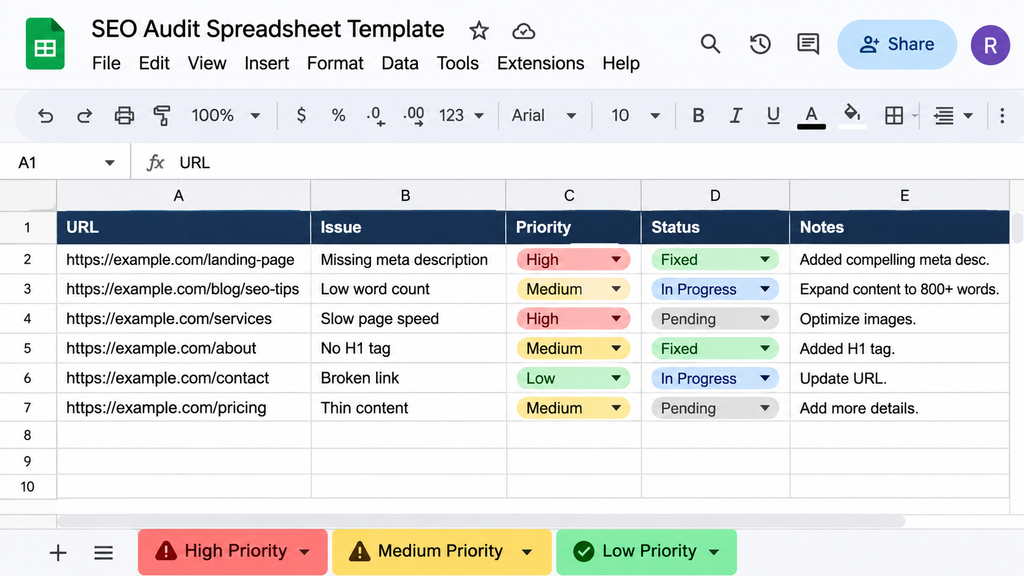
Each row contained the following columns:
- Target URL
- metadata
- Recommended metadata
- Missing tags
- Status (Not Started, In Progress, Done)
That’s all. No complicated dashboards.
The status column was the key because the SEO audit spreadsheet template turned a report into a to‑do list.
The result was simple. Our developers filtered by “High Priority” and began working.
They stopped guessing.
The emails asking “what should we fix first?” disappeared.
Implementation time dropped by half.
We finished all the recommendations weeks early.
How to Prioritize SEO Fixes (My Framework)
Every issue receives a score based on two factors: search impact and how easy it is to fix.
Then it goes into one of three buckets.
| Priority | What it means | Examples |
|———|—————-|———-|
| Stops crawlers. Revenue‑generating pages | noindex tags, site speed, missing title or H1 on product pages |
|Medium | Helps traffic or usability. Not site‑breaking; missing descriptions linking images on pages |
|Low | Looks bad. Affects pages | URLs with chains on posts missing alt text on deep archive pages |
If you are unsure where something belongs, ask one question: “Would this stop a customer or a crawler from reaching a page?” If the answer is yes, the issue belongs in High. Your own thresholds may differ. A small local business and a large e‑commerce store will draw these lines in different places.
3 Mistakes That Make SEO Templates and Worksheets Useless
I have seen these problems repeatedly.
- Much complexity. Some people copy thousands of rows from tools such as Ahrefs or Screaming Frog into one sheet. Do not clean the data. Clients and developers get overwhelmed. I call this analysis paralysis. Nothing gets fixed.
- No clear priority. If every issue looks urgent, none of them get done.
- No ownership. A fix without a name attached to it rarely gets done. Add an “Owner” column and a due date.
The fix for all three is the same. Filter first, rank second, assign third.
The One Worksheet to Build This Week: A Content and Keyword Mapping Sheet
If you only build one tab, make it this one.
Keyword cannibalization and target URL confusion hurt rankings more than bugs.
Keyword cannibalization happens when two pages try to rank for the same keyword.
Search engines cannot tell which one to choose.
Neither page performs well.
A keyword mapping sheet solves this.
Each high‑intent keyword has one URL.
Here is a simple layout:
| Keyword Related Keywords | Primary URL | Search Intent | Status |
|—|—|—|—|—|
| seo audit spreadsheet template | seo audit checklist | /seo-audit-template | Informational | Published |
How to Build Your SEO Template in 5 Steps
- Get your crawl data. Use your crawler, then delete every column you will not act on.
- Group issues by type. Technical issues, on‑page issues, and content issues work well.
- Score each issue. Use search impact and ease of implementation.
- Add status and owner columns. Use dropdowns so updates take seconds.
- Review weekly. Move rows to Done and re‑prioritize as things change.
For on‑page basics such as titles, descriptions, and headings, Google’s own SEO Starter Guide is a reference to check your SEO audit spreadsheet template against.
Do you want to proceed? Connect this part to your post on SEO audits. Connect it to your on‑page SEO checklist. The SEO audit spreadsheet template gives you a link opportunity.
FAQs
What should an SEO audit spreadsheet template include?
At the least, an SEO audit spreadsheet template must list the URL, the issue, the recommended fix, the priority level, the owner, and the status.
How many rows should an SEO audit sheet have?
Use as few rows as possible. The SEO audit spreadsheet template should hold issues that a person will act on. Filter out noise before it reaches the client.
Are SEO templates and worksheets worth it for sites?
Yes. Even a ten‑row SEO audit spreadsheet template is better than a list of emails because the SEO audit spreadsheet template shows progress and keeps priorities clear.
How often should an SEO worksheet be updated?
Review the SEO worksheet weekly during an audit.Revisit the SEO worksheet quarterly.
SEO templates and SEO worksheets do not need to be complicated. They should be clear, simple, and effective. As the best digital marketer in Malappuram, I believe in ranking SEO issues by impact, assigning an owner and a status to each issue, and keeping unnecessary noise away. A well-organized SEO strategy helps achieve better rankings, improve website performance, and drive digital growth.
Your takeaways:
- Make priority tabs.
- Filter data before showing data.
- Make a keyword mapping sheet to stop cannibalization.
- Start with the keyword mapping sheet this week.
- The keyword mapping sheet brings order to content.